> ## Documentation Index
> Fetch the complete documentation index at: https://flatfileinc-remove-rss-json.mintlify.site/llms.txt
> Use this file to discover all available pages before exploring further.
# Theme your Space
> Learn how to customize the look and feel of Flatfile to match your brand.
Flatfile supports modifying most UI elements including colors, fonts, borders, padding, and
more via the [Space](/learning-center/architecture/spaces) endpoint.
1. Start by simply updating `theme.root.primaryColor` and `theme.sidebar.logo` when calling `spaces.update()`.
2. If needed, you can customize the theme further with additional css variables.
***
### Building a theme
Learn how to create a Space with a theme, and update a theme from an Event listener.
***
## Theme reference
### `theme.root`
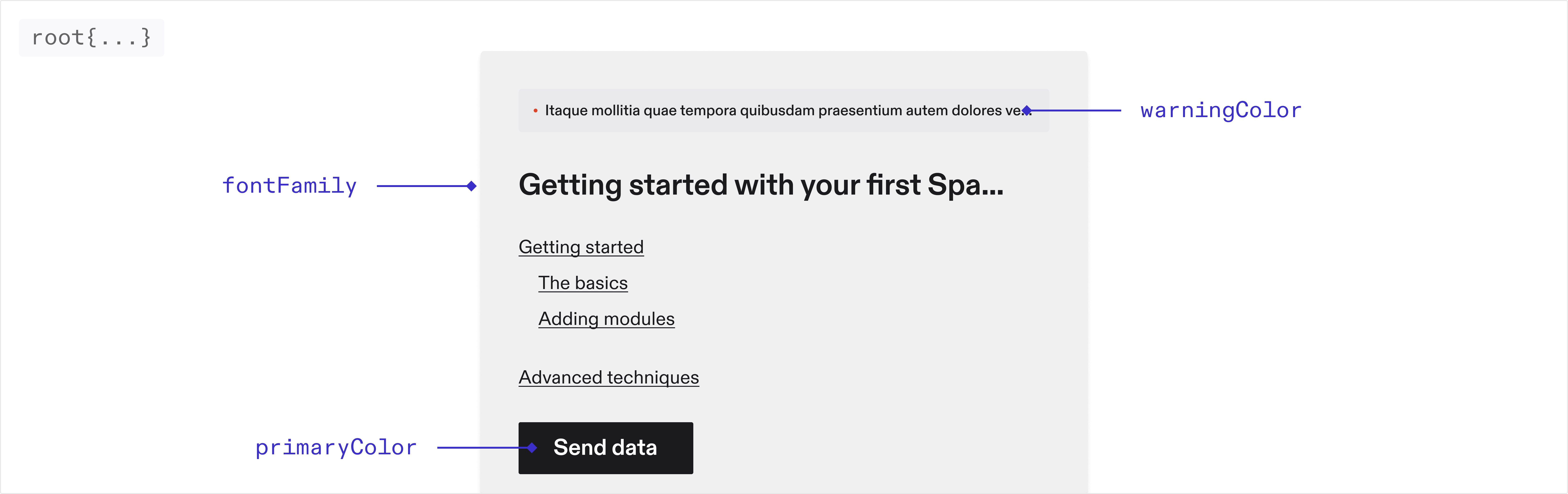 The sidebar, table and document will automatically inherit theming from your
root variables!
#### Font
The font family used throughout the application. Only system fonts are
supported at the moment
#### Colors
The primary color used throughout the application.
The color used for error messages.
The color used for warning messages.
The color used for borders throughout the application.
### `theme.sidebar`
The sidebar, table and document will automatically inherit theming from your
root variables!
#### Font
The font family used throughout the application. Only system fonts are
supported at the moment
#### Colors
The primary color used throughout the application.
The color used for error messages.
The color used for warning messages.
The color used for borders throughout the application.
### `theme.sidebar`
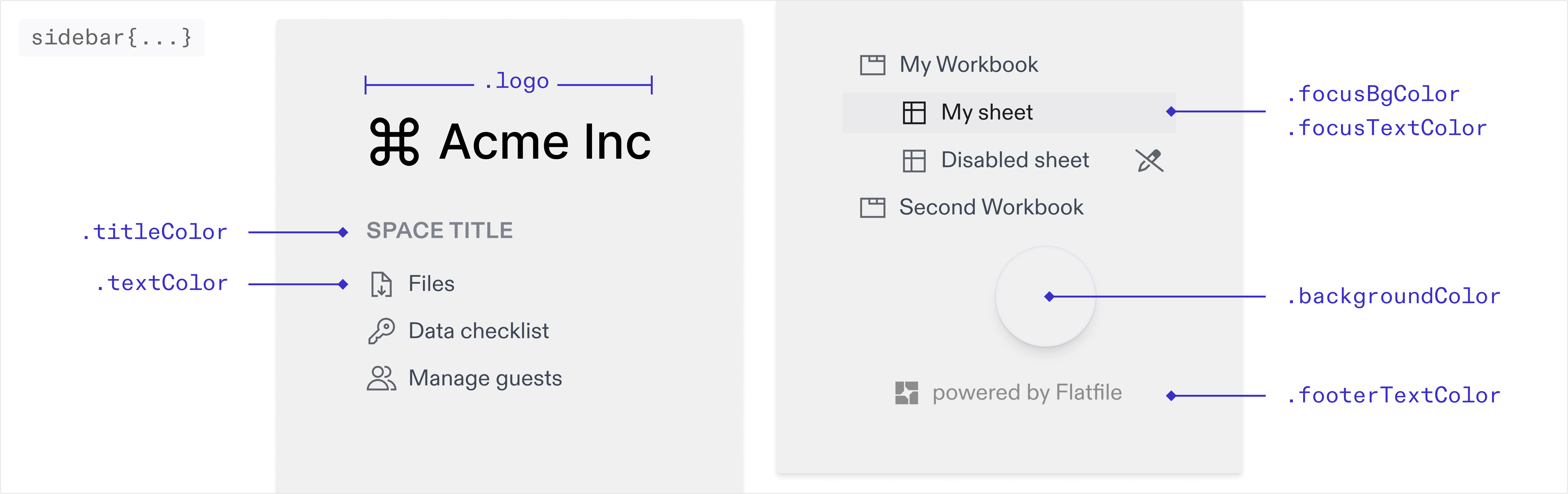 You can override the default colors of the sidebar below. If these are not set
they will inherit from your root colors.
The img path for the logo displayed in the sidebar.
The color of the text in the sidebar.
The color of the title in the sidebar.
The background color of the active navigation link. The hover state will use
the same color with 30% opacity applied.
The text color of the active/focused navigation link.
The background color of the sidebar.
### `theme.table`
You can override the default colors of the sidebar below. If these are not set
they will inherit from your root colors.
The img path for the logo displayed in the sidebar.
The color of the text in the sidebar.
The color of the title in the sidebar.
The background color of the active navigation link. The hover state will use
the same color with 30% opacity applied.
The text color of the active/focused navigation link.
The background color of the sidebar.
### `theme.table`
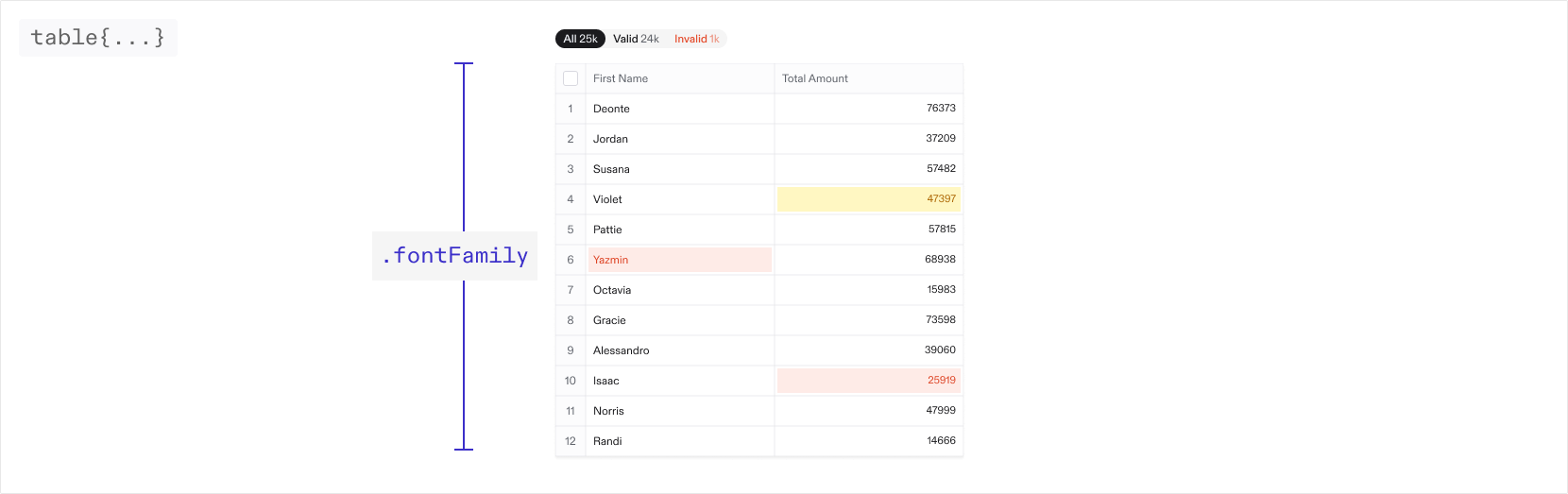 You can override the default colors and values for different elements in the
table below. If these are not set they will inherit from your root values.
#### Font
The font family used throughout the table. Only system fonts are supported at
the moment
#### Active cell
##### `theme.table.cell`
You can override the default colors and values for different elements in the
table below. If these are not set they will inherit from your root values.
#### Font
The font family used throughout the table. Only system fonts are supported at
the moment
#### Active cell
##### `theme.table.cell`
The width of the border around the active cell.
The box shadow around the active cell.
The font family for number cells.
#### Column header
##### `theme.table.column`
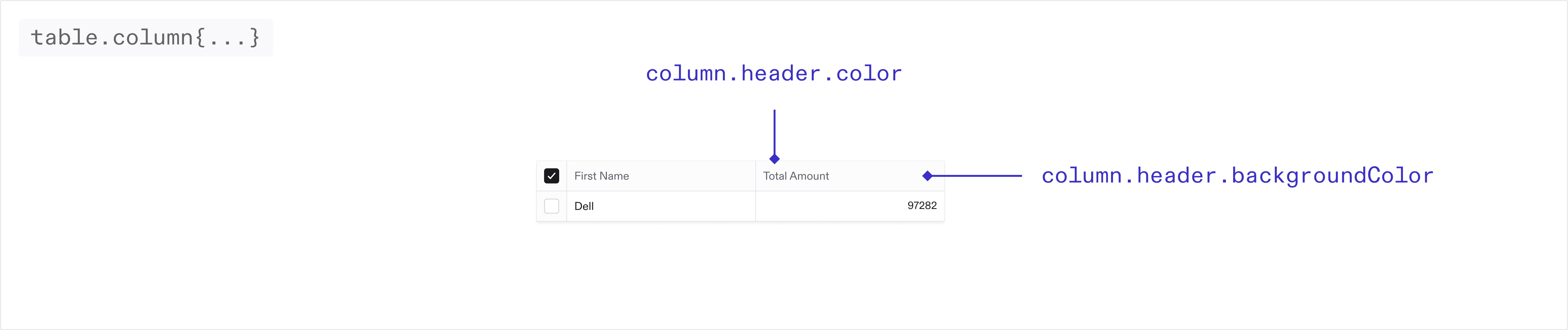 The background color of the column headers in the table.
The text color of the column headers in the table.
#### Index column
##### `theme.table.indexColumn`
The background color of the column headers in the table.
The text color of the column headers in the table.
#### Index column
##### `theme.table.indexColumn`
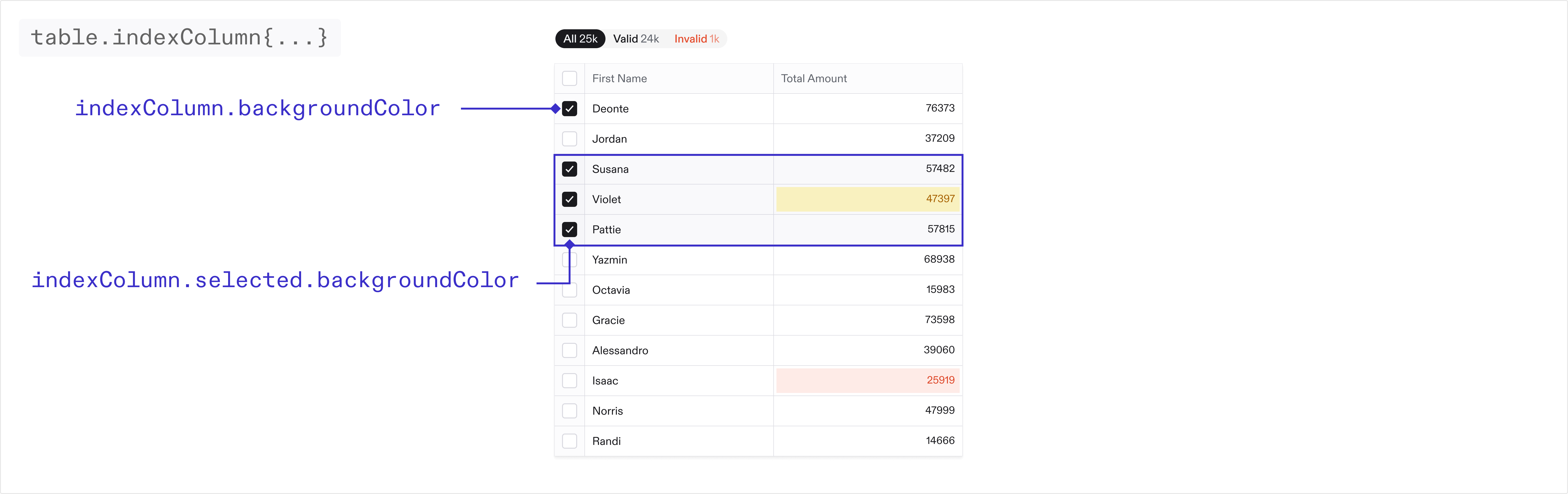 The background color of the first column in the table.
The text color of the first column in the table.
The background color of the first column in the table when selected.
#### Checkboxes
##### `theme.table.inputs`
The background color of the first column in the table.
The text color of the first column in the table.
The background color of the first column in the table when selected.
#### Checkboxes
##### `theme.table.inputs`
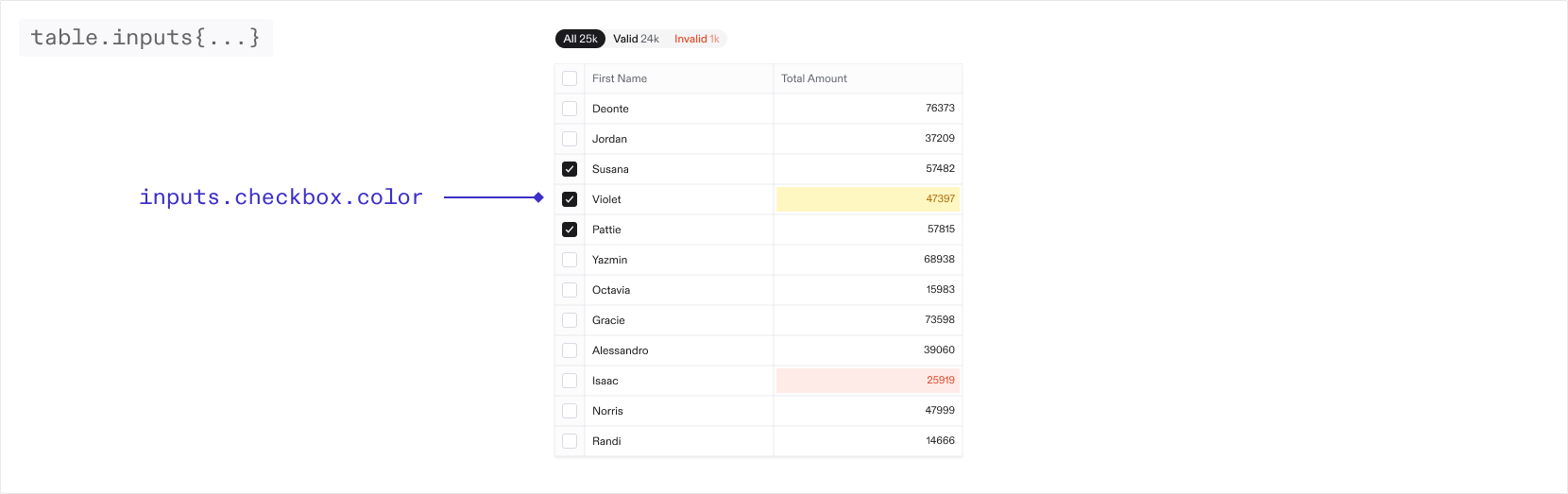 The color of the checkboxes in the table.
The color of the border for the checkboxes in the table.
#### Filters
##### `theme.table.filters`
The color of the checkboxes in the table.
The color of the border for the checkboxes in the table.
#### Filters
##### `theme.table.filters`
The border radius of the table filters
The border radius for the individual filters
The border of the table filters. By default there is no border.
When nested objects share the same border radius, small gaps may appear. To
resolve this, adjust the inner and outer border radius on the filters to
seamlessly fill any gaps.
#### Buttons
##### `theme.table.buttons`
The color of the icon buttons in the toolbar and table
The color of the pill buttons in the toolbar
### `theme.email`
You can theme the guest invite emails as well as guest email verification emails via the properties below. These are sent to a guest when they are invited to a Space via the guest management page in your Space.
Email theming is only available on the pro and enterprise plans.
The URL of the image displayed at the top of the email
The color of the text in the email
The color of the title in the email
The background color of the button
The text color of the button
The text color of the footer text
The background color of the email
#### `theme.email.dark`
If your default email theme (as set above) is light, we suggest adding a dark mode email theme. Different email providers handle dark and light mode differently. While Apple Mail and some other clients will respect dark mode variables, some email providers do not support dark mode and will display your default theme. We suggest you test your themes across various email clients before going to production to ensure consistent appearance.
The URL of the image displayed at the top of the email in dark mode
The color of the text in the email in dark mode
The color of the title in the email in dark mode
The background color of the button in dark mode
The text color of the button in dark mode
The text color of the footer text in dark mode
The background color of the email in dark mode
## Deprecation Notice
Flatfile's new design system released in Q1 2025 supports a more streamlined experience when configuring theme. The new system
accepts a more limited set of properties, but ensures those supplied properties are cohesively applied across the application.
As a result, many of the original `theme.root` properties which applied to specific UI elements have been deprecated. We have taken
steps to ensure some level of backwards compatibility for these properties in the new system - however we recommend any usage of these properties
be updated to the new system as soon as possible.
### `theme.root` \[deprecated]
#### Colors
The color used for successful Actions.
The color used for Action buttons and text. This will default to a slightly
lighter shade of your primary color.
#### Buttons
The border radius for all standard buttons.
#### Badges
The border color for all badges.
The border radius for all badges.
#### Checkboxes
The border color for all checkboxes.
The border radius for all checkboxes.
#### Interactive elements
The border color for all dropdowns, text inputs, and context menus.
The border radius for all dropdowns, text inputs, and context menus.
#### Tabstrip
The color for active tabs in a tabstrip.
The color for inactive tabs in a tabstrip.
The text color for tabs in a tabstrip on hover.
The border color for tabs in a tabstrip on hover.
#### Modals
The border radius for modals.
#### Pills
The border radius for all pills.
#### Popovers
The background color for popovers.
The border radius for popovers.
#### Tooltips
The background color for tooltips.
### `theme.sidebar` \[deprecated]
#### Colors
The text color of the footer in the sidebar.
The color of horizontal lines between sections in the navigation.
### `theme.document` \[deprecated]
The color of horizontal rules in Documents.
## Example Project
Find the theming example in the Flatfile GitHub repository.
Clone the theming example in Typescript
Clone the theming example in Javascript